Dental Shooting
- 1.7
- Rating
- 10.00K
- Installs
- Free
- Price

 Analysis by App-foxy
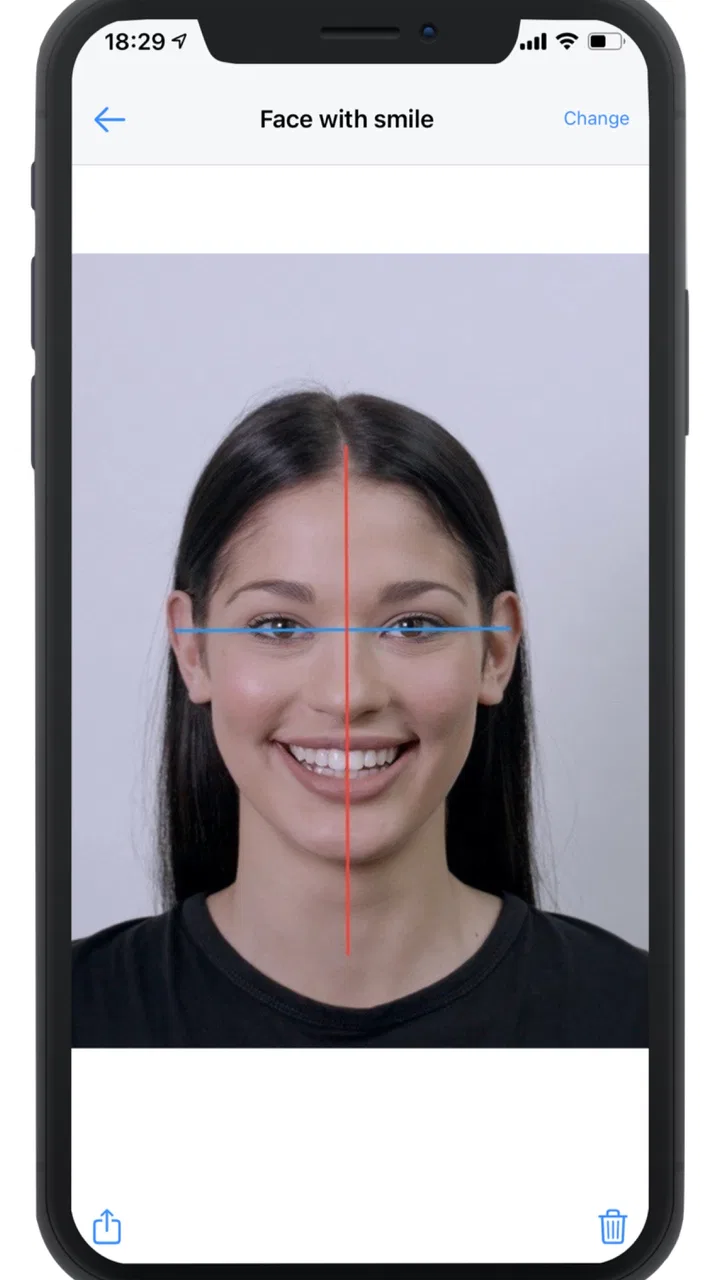
I approached Dental Shooting as a practical tool rather than a general camera app. Its purpose is narrow: helping dental professionals take and edit clinical photographs from a mobile device. That focus is useful when a dental image needs to be captured quickly, kept visually consistent, and prepared for discussion with a patient or colleague. It is not an app I would recommend simply because someone wants a better everyday camera.
The app is published by Dental Shooting SRLs and sits in the medical category. It is free to install, rated for Everyone, and supports Android devices running version 5.0 or later. Its current version is 2.9.10, while the project was released on April 28, 2022. Those details matter because the app is aimed at a professional workflow, but it remains accessible to people using older Android hardware.
How Dental Shooting feels in current use
The main appeal is the combination of capture and editing in one place. Instead of taking a photograph with the standard camera, switching to another editor, and trying to remember which adjustments were made, I can treat the dental image as a small, repeatable documentation task. That makes the app most interesting for clinics that want a dedicated routine rather than a collection of unrelated phone tools.
You May Also Like

 Blood Strike: 2.5 Anniversary
Blood Strike’s Loadouts Turn Every Drop Into a Tactical Gamble
A close look at Blood Strike’s custom loadouts: how fast access to signature weapons reshapes its battle royale rhythm, rewards preparation, and narrows the gap between fights.

 Pandora - Music & Podcasts
Pandora’s Music Is Easy to Start, but Harder to Recover
Pandora’s strength is its low-effort path from a seed to a station. Its weak spot is how much confidence it asks you to place in connection, setup, and quiet recovery.

 8 Ball Pool
 Is Built on Rivalries, Rematches, and Routine
A close look at the rivalries, rematches, shared routines, and unanswered safety questions that turn a quick pool match into a persistent mobile community.

 Samsung Music
’s Quiet Strength Is Playing What You Already Own
Its reach comes less from spectacle than from dependable access to a personal library. That simplicity is both the app’s strongest retention engine and its ceiling.

 AccuWeather: Weather Radar
AccuWeather Review: A Quick, Clear Forecast for Everyday Decisions
For everyday plans, the best forecast is the one you can understand quickly. AccuWeather makes rain timing, radar, and local conditions easy to act on, with a few trade-offs.

 Hill Climb Racing
Why Hill Climb Racing Still Turns Crashes Into One More Run
A tiny car, a bumpy hill and one more upgrade: Hill Climb Racing keeps resurfacing because its simple chaos makes every near-miss feel personal.
More From Our News Desk
View All News


In a typical appointment, the useful sequence is straightforward: prepare the phone, capture the required view, inspect the result, and make restrained edits before using the image for communication or records. The important word is restrained. Dental images carry clinical meaning, so aggressive filters or decorative effects would be a poor fit. The editing side is valuable when it improves clarity without making the photograph look artificially altered.
I would still keep the phone steady and pay attention to lighting before touching any editing control. An editor can improve presentation, but it cannot reliably rescue a badly framed image, motion blur, glare, or an obstructed view. That is one of the app’s practical limits: it supports a photographic process, but it does not replace careful photographic technique.
A realistic clinic workflow
Imagine a dentist documenting a patient before discussing a treatment plan. With the usual phone camera, the image may end up mixed with personal photographs, edited through a separate application, and shared without a consistent visual approach. Dental Shooting offers a more focused starting point. I would use it to capture the relevant dental view, check whether the area is visible, make only the necessary corrections, and then move on to the consultation.
The hidden benefit of that routine is not a dramatic visual effect. It is reduced decision-making. When a team uses the same capture-and-edit habit, staff members are less likely to improvise with different camera modes or random editing apps. That can make before-and-after comparisons easier to understand, even though the app itself does not guarantee that every photograph will be clinically comparable.
For that reason, I would create a simple internal habit around it: use similar positioning, similar lighting, and similar framing whenever a case will be followed over time. The app can support consistency, but the clinic has to supply the protocol. This is an important trade-off. A specialized tool helps organize the work, yet it cannot create a standardized photographic method on its own.
Editing is helpful only when it stays honest
The editing function is the part that separates this app from simply opening the default camera. I see the strongest use for small corrections that make a dental photograph easier to inspect or present. The weaker use would be changing the appearance so heavily that the image no longer represents what was actually photographed.
My advice is to treat every adjustment as documentation support, not cosmetic retouching. Keep an original capture whenever the image has clinical importance, and use the edited version for a clearly defined purpose such as explaining an area to a patient. That approach protects the value of the photograph while still taking advantage of the app’s editing workflow.
A second useful tip is to review the image at full size before considering it finished. A thumbnail can look sharp while hiding a small area that is out of focus or partly covered. This is especially important when the image will be used to explain a treatment decision. The dedicated app may make the process more convenient, but the final quality check still belongs to the person taking the photograph.
Who will get the most from it
I think Dental Shooting is best suited to dentists, dental assistants, hygienists, students in clinical training, and practices that regularly use intraoral or extraoral photographs as part of communication. It may also appeal to a small clinic that wants a straightforward mobile workflow without building a larger photography system.
It is less convincing for a casual user. If you only need to photograph a tooth once, the standard camera plus a general image editor may be quicker to understand. Likewise, someone looking for a broad medical image-management platform should not assume that a focused dental photography app will cover every administrative or record-keeping need.
The app also makes more sense when several people share the same working environment. A solo user may appreciate the dedicated purpose, but a practice gets more value when the application becomes part of a repeatable process. In that setting, the question is not whether it takes a better photograph automatically. The question is whether it makes the preferred workflow easier to repeat.
What the version history tells existing users
The current version, 2.9.10, shows that the app has moved beyond its initial release rather than remaining at its first public build. I view that as a positive sign for an established workflow: existing users have a current version to work with, and the product has had time to evolve since its launch.
At the same time, a version number alone does not tell me that every clinic-specific need has been solved. I would update carefully on a device used during appointments, test the capture and editing routine afterward, and avoid changing the workflow immediately before an important case. That is not a criticism of this particular release; it is sensible practice for any tool involved in clinical documentation.
For someone already using an older build, the practical test is simple. Does the current release make the same routine more dependable, easier to navigate, or more compatible with the phone in daily use? If the answer is yes, updating is worthwhile. If the old setup is stable, I would still test the newer build outside appointment hours before making it the standard for the whole team.
Where the app still needs careful handling
The most obvious warning sign is its public reception. Dental Shooting has an average rating of 1.7 from around 75 ratings and six written reviews. That is a weak signal compared with the app’s focused professional purpose, and I would not ignore it when deciding whether to introduce the tool across a clinic.
A low average does not explain every individual problem, so I would not treat it as proof that the app is unusable. It does tell me to test the complete workflow on the actual phones and in the actual lighting conditions used by the practice. A tool can appear fine in a quick demonstration and still become frustrating when staff need to capture several views in succession.
The app has passed the threshold of over 10,000 installs, which suggests that it has reached a real audience, but that figure should not be confused with proof of professional reliability. Adoption and suitability are different questions. I would judge it by image quality, speed, ease of review, and how comfortably it fits the clinic’s documentation habits.
Another point to consider is cost over time. The application is free to install, but it includes in-app purchases ranging from $49.99 to $139.99 per item. That changes the decision for a practice. I would first identify which part of the workflow is genuinely useful in the free experience, then calculate whether a paid item solves a recurring problem rather than merely adding an attractive extra.
For an individual learner, that price range may be difficult to justify without a clear need. For a busy practice, a paid feature could be reasonable if it saves repeated steps and is used often. The right question is not whether the purchase is expensive in isolation. It is whether the improvement is measurable in the clinic’s daily routine.
How it compares with ordinary alternatives
The default phone camera has one major advantage: familiarity. Almost everyone knows how to open it, focus, and take a picture. A general editor also offers flexibility for many kinds of images. If the need is occasional documentation, those tools may be enough, especially for a user who does not want to learn another interface.
Dental Shooting has a different advantage: it is built around the idea that dental photographs deserve their own workflow. That focus can reduce the temptation to treat a clinical image like a normal social photograph. The trade-off is that a specialized app may feel unnecessary when the user only needs basic capture, cropping, or brightness adjustment.
I would choose this app over the usual alternatives when dental photography is a recurring task and the team values a dedicated process. I would choose the standard camera and a trusted editor when the work is occasional, when the clinic already has a reliable photography protocol, or when staff need broader image tools than a dental-focused application provides.
There is also a privacy and organization consideration in the everyday workflow. I would avoid leaving sensitive patient images mixed casually with unrelated personal media, and I would establish a clear process for reviewing and transferring photographs. The app’s specialized purpose does not remove the clinic’s responsibility to handle patient images appropriately. That operational discipline matters as much as the editing controls.
Questions I would answer before installing
Can it run on an older Android phone? Yes, the minimum requirement is Android 5.0, so the compatibility range is relatively broad. However, compatibility on paper is not the same as a comfortable clinical experience. I would test the camera responsiveness, storage space, and screen visibility on the exact device used by the staff.
Is it suitable for patients? The age rating is Everyone, but that describes access rather than professional purpose. I see it primarily as a tool for dental teams and learners. A patient might view an image during a consultation, but the app’s real value is in helping the professional create and prepare that image.
Does it replace a proper dental camera setup? I would not assume that. A phone-based app can be convenient and affordable, but the final result still depends on the phone, lens, lighting, positioning, and the person taking the photograph. Practices with demanding documentation standards should compare its output with their existing equipment before making a full switch.
Is the free installation enough for a serious trial? It gives a practice a low-risk way to examine the workflow, but the in-app purchase range means the full decision may involve additional spending. I would run a limited trial, ask several staff members to use the same routine, and record where time is saved or lost before buying anything.
Will it automatically make every image professional? No app should be judged that way, and this one is no exception. Its value is in supporting capture and editing, not in replacing clinical judgment or photographic technique. The best results will come from users who already understand framing, focus, lighting, and the difference between useful correction and misleading alteration.
What I would watch in future use
I would pay attention to whether updates make the app more dependable during repeated capture sessions. For a dental practice, small workflow improvements can matter more than flashy editing options. Faster review, predictable saving, and a clear path from capture to consultation would have a direct effect on usefulness.
I would also watch how well the app fits a team rather than just one enthusiastic user. A tool that works for one dentist but confuses assistants is not truly efficient. Before adopting it widely, I would have different staff members perform the same task and compare the results. That test reveals friction that a short personal trial can miss.
Finally, I would keep an eye on the balance between convenience and documentation integrity. The more editing becomes part of the workflow, the more important it is to distinguish an original clinical capture from a presentation-ready copy. That distinction is one of the most valuable habits a clinic can establish around this kind of application.
My overall view is cautious but practical. Dental Shooting has a clear purpose, a free entry point, broad Android compatibility, and a current build that reflects continued development. It could be a useful addition for a dental team that wants a dedicated way to capture and edit images. However, the low average rating, paid in-app items, and dependence on the user’s photographic technique mean I would test it rather than adopt it blindly.
My recommendation is to treat it as a focused workflow experiment, not an automatic replacement for your camera setup. If your clinic takes dental photographs regularly, run a controlled trial and judge the results against your existing method. If you only need occasional pictures or want a general-purpose editor, the usual camera tools may remain the simpler choice.
FAQs for Dental Shooting
01What is Dental Shooting?
Dental Shooting is a casual mobile game built around a playful dental-care theme. Instead of offering real medical treatment, it presents users with entertaining shooting and arcade-style challenges connected to teeth, dentists, and oral hygiene. During my review, the game felt designed for short sessions, with simple objectives and an accessible presentation that can appeal to players who enjoy light, humorous games rather than complex strategy or simulation experiences.
02How do you play Dental Shooting?
The gameplay is generally easy to understand: players aim at targets and shoot them while trying to complete the objective of each stage. Depending on the level, targets may represent dental problems, objects, or characters related to the game’s theme. Controls are intended for touchscreens, so aiming and firing can be learned quickly. However, later stages may require better timing, accuracy, and attention to avoid missing important targets.
03Is Dental Shooting suitable for children?
Dental Shooting has a cartoon-style concept and straightforward controls, which may make it approachable for younger players. Nevertheless, parents should check the game’s age rating, advertising policy, and in-app purchase settings before allowing children to play. Even games with simple mechanics can include promotional videos, optional purchases, or online features. Adult supervision is recommended, especially if the device is connected to a payment method.
04Does Dental Shooting require an internet connection?
The basic gameplay may work without a constant internet connection, making Dental Shooting convenient for short sessions while traveling or when mobile data is unavailable. However, certain features can depend on connectivity, including advertisements, reward videos, analytics, updates, or promotional content. Availability may also vary between Android and iOS versions. For the most reliable experience, install the latest official version and test the game after temporarily disabling your connection.
05Is Dental Shooting free to download and play?
Dental Shooting can typically be downloaded at no initial cost, but free installation does not necessarily mean that every feature is completely free. The game may use advertisements or offer optional in-app purchases connected to extra rewards, boosts, or progression. You can usually play without spending money, although ads may appear between levels or after requesting bonuses. Before downloading, review the store listing for current pricing, permissions, and purchase information.
Pros
- Simple controls make it easy to pick up and play.
- Short levels are convenient for quick gaming sessions.
- Bright visuals give the game a playful
- cartoon-like style.
- Progression adds new challenges and keeps gameplay moving.
- Works well for players who enjoy casual arcade games.
Cons
- Gameplay may feel repetitive after extended sessions.
- Some challenges can become frustrating without precise timing.
- The cartoon dental theme may not appeal to everyone.
- Limited depth may disappoint players seeking a complex game.
- Ads or in-app purchases may interrupt the overall experience.

Dental Shooting
Gallery